
Modern digital work rarely happens in one place. An idea might be captured on a phone during the morning commute, expanded into a project brief on a desktop, and reviewed from a tablet later in the day. The flexibility is useful, but it comes with a less obvious problem: information starts to scatter.
Notes end up in one application. PDFs sit in a download folder. Bookmarks stay attached to a particular browser. A newer version of a document may live on another computer. Before long, the difficult part is no longer remembering the information itself. It is remembering where it was stored.
Cross-platform synchronization is meant to reduce that friction. At its best, it does more than copy files between devices. It keeps information available across the tools and screens that make up a person's workflow while preserving enough context to make those files useful when they reappear somewhere else.
Fragmentation usually develops through small, reasonable decisions.
A note-taking app may be convenient on a phone, even though its desktop version is awkward. A PDF might be saved locally because opening cloud storage feels like unnecessary effort. A useful code snippet may be pasted into a messaging app simply because that is the fastest way to move it from one computer to another.
None of those decisions seems serious on its own. The trouble comes later, when temporary workarounds become the normal system.
A fragmented knowledge base often produces three familiar problems:
Lost context: The note survives, but the original source, web link, attachment, or surrounding explanation is somewhere else.
Version confusion: Two devices contain different versions of the same document, making it unclear which copy should be edited.
Tool switching: Moving information between incompatible applications adds small interruptions that accumulate over a long workday.
The solution is not necessarily to put everything into one application. A more durable approach starts by deciding how information should move, where the authoritative copy should live, and which formats can survive changes in software.
The easiest synchronization experience often comes from staying inside one vendor's ecosystem. A phone, tablet, and laptop from the same platform may share documents, notes, photos, and other data with very little configuration.
The trade-off becomes more noticeable when the workflow crosses platforms. A user may need to move data into another operating system, a specialist application, a self-hosted service, or a tool from a different vendor. Export options suddenly matter.
That is where open and widely supported formats become useful.
Local-first software takes a different approach from systems that depend primarily on a remote server. A local-first application keeps a usable copy of data on the user's device and is designed to remain functional when the network is unavailable. Cloud services can still play an important role in synchronization, backup, or collaboration.
This model can make a knowledge system more resilient because the data does not depend entirely on one service being available.
Plain-text formats can provide another layer of resilience. Markdown is commonly used for notes, while formats such as JSON or OPML can represent structured data in particular workflows. The exact format matters less than the principle: important information should not be trapped inside a proprietary database if long-term portability is a priority.
There are several benefits.
Portability: Plain-text files can be opened and processed by a broad range of editors and tools without depending on one proprietary application.
Control: Locally accessible files give users more flexibility over backup, synchronization, and migration strategies.
Interoperability: A Markdown document can generally move between compatible writing, note-taking, version-control, and publishing tools without requiring the original application.
There is an important caveat, though. Open files do not guarantee perfect migration. A proprietary application may store metadata, attachments, links, or database relationships that cannot be represented completely in a simple exported file. Portability is therefore partly a question of format and partly a question of how much context the application keeps outside that format.
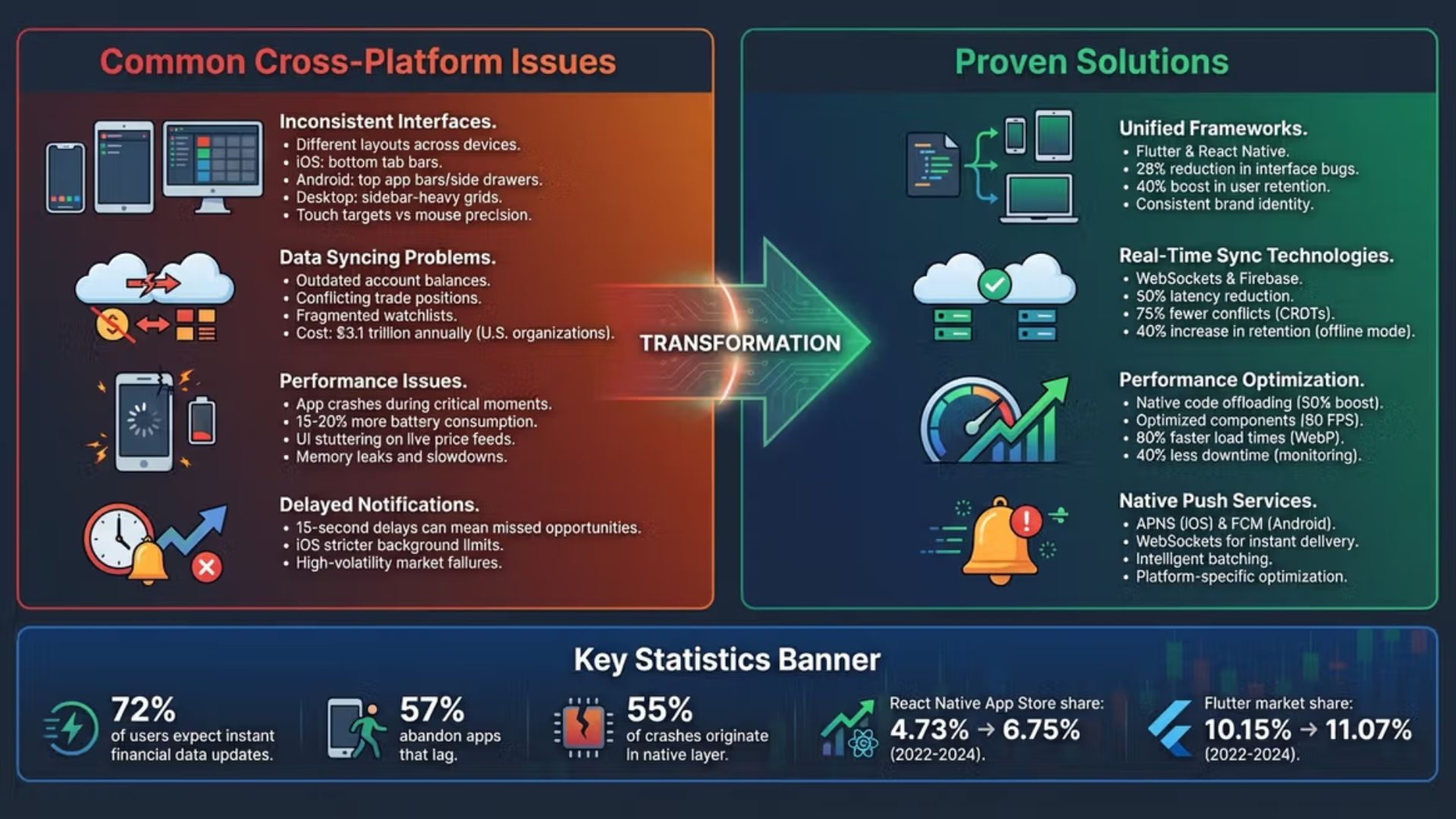
Copying a file from one device to another sounds straightforward. Synchronizing information that is being edited on several devices at different times is much harder.
Consider a project outline edited on a laptop while offline during a flight. Meanwhile, another version of the same document is changed on a desktop. When both devices reconnect, the synchronization system has to determine how those changes relate to one another.
The simplest systems may detect the conflict and create another copy, sometimes adding a label such as Conflict Copy to the filename. That approach is easy to understand but can leave the user responsible for comparing the versions manually.
More sophisticated systems can use techniques such as CRDTs, operational transformation, or application-specific merge logic to represent concurrent edits and reconcile compatible changes. These approaches are especially useful in collaborative editors and other applications where several clients may modify the same underlying data.
Not every synchronization problem requires a complex algorithm. For many ordinary files, version history and clear conflict warnings are more practical than attempting to merge every change automatically.
The important point is that synchronization and conflict resolution are separate concerns. Moving a file reliably does not necessarily mean deciding which competing edit is correct.
Network conditions create another constraint.
A collection of text notes may be small enough to synchronize almost instantly, while photographs, audio recordings, videos, and large research libraries can consume substantial storage and bandwidth. Synchronizing every file to every device may therefore be unnecessary.
Selective synchronization can help. A device might keep indexes and frequently used documents locally while leaving large media files in remote storage until they are needed. Other workflows may choose to synchronize only specific folders or project directories.
This is not just a performance decision. It also affects storage costs, battery usage, offline availability, and privacy.
A reliable system is easier to design when the workflow is separated into three broad layers: capture, transit, and storage.
[ Capture Layer ] ---> [ Transit Layer ] ---> [ Storage Layer ] (Mobile/Browser) (Sync Mechanism) (Local/Cloud)
Capture should happen wherever useful information appears. Mobile widgets, browser extensions, desktop shortcuts, and voice notes can all reduce the delay between having an idea and recording it.
The goal is not necessarily to organize everything immediately. In many workflows, quick capture works better when classification happens later.
The transit layer moves information between devices and services. Depending on the system, this might involve a cloud synchronization service, peer-to-peer transfer, a self-hosted server, or a combination of methods.
This layer should be as invisible as possible. If users constantly have to rename files, manually copy folders, or check whether synchronization has completed, the system is creating the same friction it was supposed to remove.
Storage provides the durable foundation.
Keeping important information in accessible formats makes migration easier if an application changes direction, raises its price, shuts down, or simply stops fitting the workflow. It is also worth distinguishing between a primary working copy and backups. Synchronization keeps data consistent across locations; it does not automatically provide protection against accidental deletion, corruption, or ransomware.
That distinction is easy to overlook and important to get right.
Even a well-designed setup can become inefficient if the underlying habits are poor.
Not every file needs to exist on every device. Cached installers, temporary downloads, large media collections, and old project folders can consume storage without providing much value on a phone or lightweight laptop.
Selective synchronization is often a better compromise than trying to make every device a complete mirror of every other device.
Synchronization and backup solve different problems.
If a file is accidentally deleted and that deletion propagates across synchronized devices, synchronization has worked exactly as designed. It has not protected the file.
A separate backup strategy, ideally with versioned or historical copies, addresses that problem.
The sensitivity of the information should influence the synchronization architecture.
For ordinary notes, convenience may matter most. Sensitive research, confidential business documents, credentials, or personal records require a more careful look at encryption, authentication, access controls, and where the service provider can access the underlying data.
End-to-end encryption can offer stronger protection in appropriate scenarios, but it is not a universal answer. It can affect features such as server-side search, collaboration, recovery, and account management. The right choice depends on the threat model and the requirements of the workflow.
A knowledge base can become a permanent migration project if every new application looks like the answer.
Moving thousands of notes from one platform to another takes time, and every migration introduces opportunities for broken links, missing metadata, or lost attachments. A stable system that works well is often more valuable than a theoretically better system that requires constant rebuilding.

Cross-platform synchronization is not something that can be installed once and forgotten. Devices change. Applications disappear. Storage requirements grow. Work habits evolve.
A durable system therefore needs a few basic principles: keep important data in portable formats where practical, maintain independent backups, avoid unnecessary synchronization, and make the capture process easy enough that information does not end up stranded in temporary locations.
It is also worth reviewing the system periodically. Which folders are actually being used? Are old projects taking up space on every device? Are there applications that have become unnecessary? Can important information still be exported in a usable form?
A good synchronization setup does not make every device identical. It makes the right information available in the right places while keeping the underlying knowledge portable.
That is the real goal: not perfect duplication, but dependable access without unnecessary fragmentation.